How Sign, Confirm and Approve differ, how to read Web3 signature windows and avoid hidden permissions that grant access to your tokens
Content
In the Web3 ecosystem, users constantly have to confirm something — for example, logging into a site, swapping tokens, staking, or buying an NFT. Behind this action is not just clicking “OK” but a real blockchain signature created by your private key. Every time you click “Sign” or “Confirm,” it can lead to funds being debited or access to them being granted without your knowledge.
In this article we will cover:
how a simple message (Sign) differs from a gas-paid transaction (Confirm) and permissions (Approve, Permit);
how to learn to read confirmation windows that often seem unclear;
why setapprovalforall has become scammers’ favorite tool.
Signing a transaction is not a formality; it’s an important part of security. When a person understands exactly what they’re approving, they protect their wallet from schemes where theft is masked as an ordinary swap or mint.
What is a digital signature on a blockchain
A digital signature on a blockchain confirms that an action was performed by your wallet. It is created using a private key, but the key itself is never transmitted or stored on the network’s or website’s side. Thanks to this, the mechanism remains secure, as the system can verify that a message is indeed signed by the owner without revealing the key itself.
When you confirm an operation, the wallet creates a unique signature tied only to that action. If someone tries to repeat it without your involvement, the network will detect the forgery. This system works like a digital seal that protects you from data tampering and proves the authorship of each transaction.
It’s important to understand the difference between types of confirmations. Transaction confirm is a full-fledged record on the blockchain for which a network fee is deducted. But signing a smart contract or a regular message — the “Sign” action — is most often used only to prove address ownership, for example when authorizing in a dApp. In this case the signature does not go on-chain, no fee is charged, and the operation is instantaneous.
Types of signatures and what they mean
A wallet can request different forms of confirmation, each with its own consequences. It all depends on what confirm means in a particular case and why the system is asking for your consent. Sometimes it’s a simple token transfer; other times it’s granting long-term access to a smart contract. The better you understand which request you’re seeing on screen, the higher your security level and the lower the risk of accidentally approving a dangerous action.
Type of action
What you’re confirming
What happens
Risk level
Transaction (Confirm)
Token transfer, swap, staking
On-chain record, gas is deducted
Medium
Approve / Permit
Permission for a contract to manage your tokens
Long-term access for a smart contract
High
Sign Message / Sign-In
Authorization or data confirmation
No on-chain record, free
Low
Blind Signature
“Blind” signature without visible contents
May grant hidden access to tokens
Very high
As you can see from the table, approve defi and so-called blind signatures are among the most dangerous types of actions. One careless confirmation can result in a smart contract gaining full access to your tokens. In such cases the user effectively hands control of their funds to third-party code and often doesn’t notice it right away. To avoid this, carefully read the text of the request and check the contract address before hitting the confirm button.
What happens when you click “Confirm”
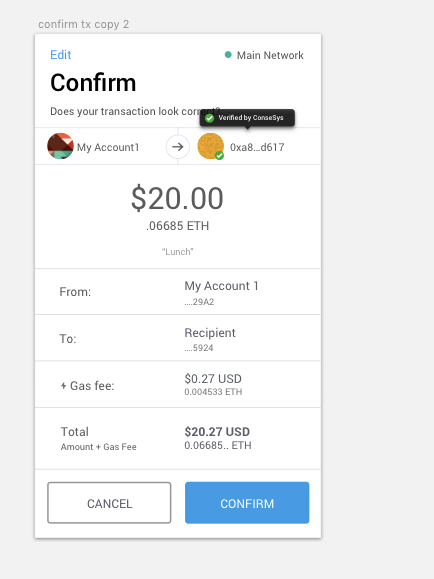
When a user clicks “Confirm” to make a transfer or swap, the wallet creates a transaction confirmation with a full set of data about the upcoming action. At this stage the system shows all key parameters of the operation, and this is exactly when you can spot possible mistakes or an address substitution. Before you sign, it helps to carefully review a few items to ensure everything is proceeding as intended.
Recipient address (who you’re sending to).
Amount and token type (what exactly you’re transferring).
Network (where the transaction is executed).
Estimated fee (gas fee).
If during the check you notice that the recipient address doesn’t match the expected one or the fee turns out to be too high, you can simply cancel the operation. An error at the confirmation stage won’t lead to token loss, because the wallet simply won’t send the transaction. This is safe and lets you calmly recheck the details before trying again.
What “Approve” really means
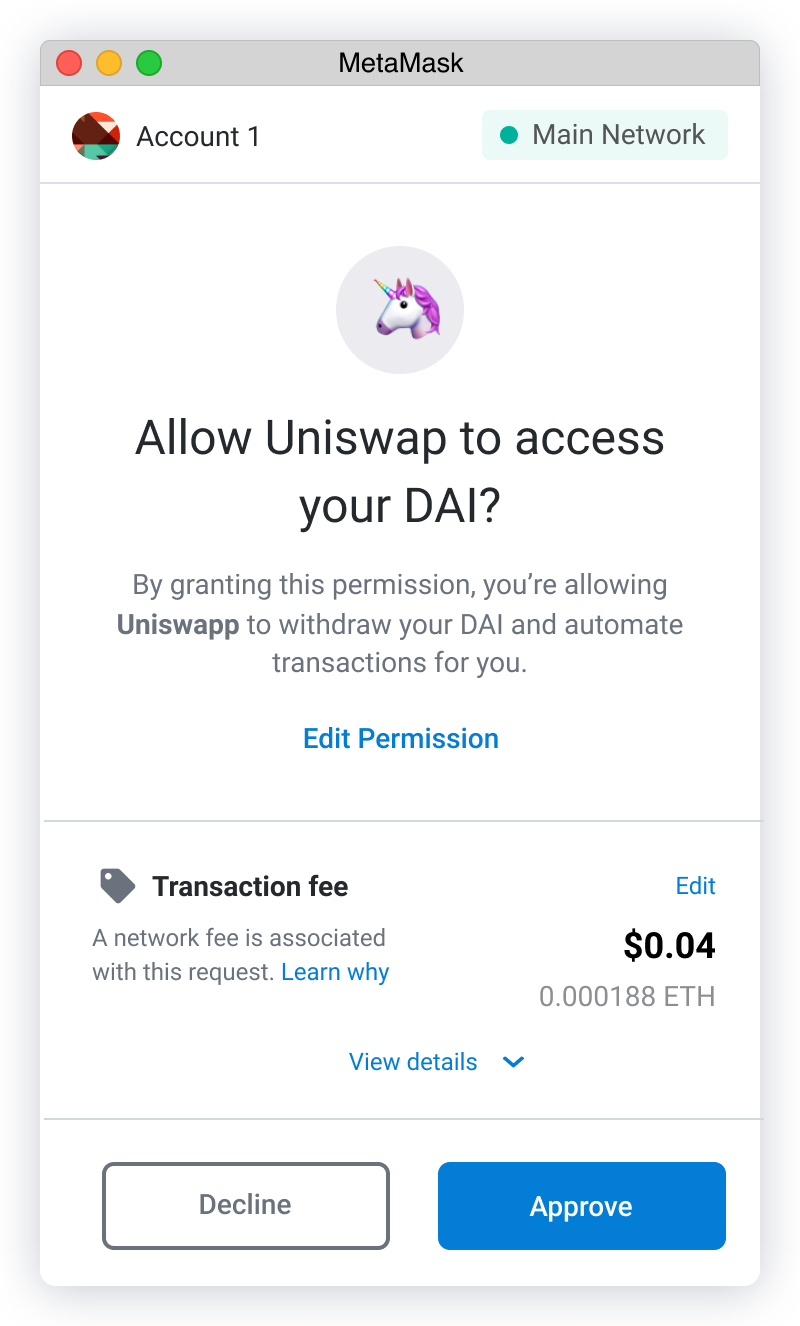
Approve token does not mean transferring funds and is not related to debiting. This action grants a smart contract the right to manage your assets on behalf of your wallet. Without such permission, decentralized exchanges, staking pools, and farming services won’t work correctly because they need access to your tokens to execute swaps or accrue rewards. The problem is that this very mechanism often forms the basis of scam schemes.
Attackers can spoof a request and show you approve usdt or permission for other popular tokens with the label “Unlimited,” i.e., for an unlimited amount. In such a situation the contract gains the right to transfer your assets without additional confirmations, so you should avoid such permissions and, if necessary, immediately revoke access.
How to tell a safe Approve:
Amount: a proper request is limited to a specific number (e.g., 100 USDT). If it says “Unlimited,” that’s a red flag.
Contract: the address should be verified. Check it via Etherscan or Tronscan (contract analysis).
If you have already granted a contract access, you should definitely revoke it. For this there’s the revoke.cash service, which lets you cancel token permissions in a few clicks. On the TRON network you can achieve the same result via the Tronscan explorer under Wallet → Permissions. This tool plays an important role in tron wallet security because it helps you monitor all active permissions and quickly close the unnecessary ones.
(Approve permission window in MetaMask).
How to read a request before signing
Your level of web3 security fully depends on how attentively you treat each action. Before you click wallet confirm, stop for a few seconds and check the key details. This simple rule often prevents token loss and helps you spot a suspicious request in time.
Website address — does it match the official dApp domain?
Action text — the wallet usually states exactly what’s happening (“Allow spending of your USDT” = “Разрешить трату ваших USDT”).
Network — does it match the required one (Ethereum, TRON, BSC)?
Contract address — if in doubt, copy it and check the contract on Tronscan or Etherscan.
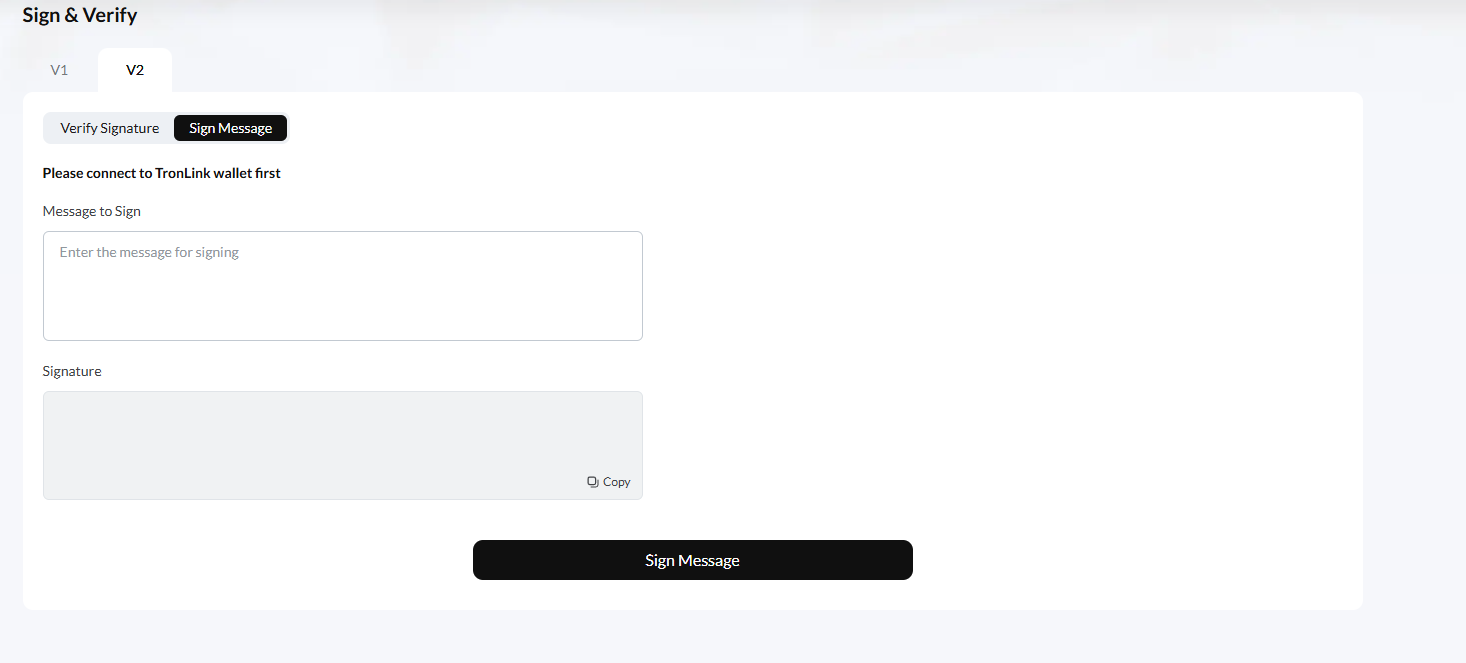
(Sign Message window in TronLink).
The main rule is that if you don’t understand why a site is asking for a signature, or the request text looks suspicious, especially if it’s a blind signature, it’s better not to confirm anything. It’s much safer to simply decline the action and sort it out calmly later than to try to recover assets after a theft.
Examples from wallets
Each wallet displays a confirmation window in its own way, but the meaning is the same everywhere: the user must understand exactly what they’re about to approve. The more familiar you are with your wallet’s interface, the easier it is to spot a suspicious request and avoid an unwanted action. Below are examples of how this looks in the most common apps.
MetaMask
In MetaMask, each action is accompanied by an explanation that helps you understand what’s happening. Most often you’ll see a sign message metamask request, which is needed when a site asks you to confirm login or authorization. This is a safe type of signature because it only proves address ownership and doesn’t affect your funds. However, the Approve request window requires special attention: it lists the token, amount, and contract address. If the permission includes the word Unlimited, it’s better to refuse and verify exactly what the site is asking for.
(example of a transfer in MetaMask).
TronLink
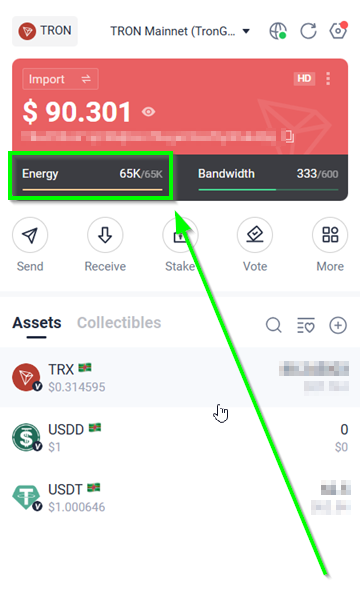
(TronLink wallet).
In the TronLink wallet, the process looks a bit different. When you need to sign a transaction tronlink, a Trigger Smart Contract window appears on the screen where you can see the Energy and Bandwidth resources, as well as the contract address that will be called. These parameters let you assess what code is being executed and how much energy will be spent. If the resources look unusually large or the contract address raises doubts, you should pause and recheck the data manually.
Cut your USDT TRC-20 costs with Tron Pool Energy. Safe, transparent and optimized for every transaction.
Other wallets such as OKX, Trust Wallet, and Coinbase Wallet use a similar principle. They show the user exactly what is happening at the moment of confirmation — it could be a transfer, granting permission, or logging into a site. Regardless of the wallet you choose, it’s important to read the request text carefully and not click the button if the meaning of the action remains unclear.
Results
A blockchain signature is not just an action but a legally and cryptographically significant confirmation that ties your wallet to a specific decision. When you use Sign to log in, you’re merely confirming address ownership and not risking assets. Approve defi, however, works differently — it gives a smart contract the right to manage your tokens. That’s why it’s important to understand exactly what action you’re taking and what consequences it entails.
Understanding the differences between Sign, Confirm, Approve, and Permit in crypto is the foundation of every user’s personal security. Always check what exactly you’re signing, and avoid sites that ask you to perform an action without explanation. Even experienced wallet owners lose assets when they confirm requests automatically without reading their contents.
Share
Link
Did you like the article?
FAQ
What does it mean to “sign a transaction” in a wallet?
This happens when your private key generates a digital signature for the selected operation. A wallet, such as MetaMask or TronLink, shows all the transaction details, and you confirm them by creating a signature that proves to the network that you are the initiator of this action.
How does “Sign” differ from “Confirm”?
Sign is used when you need to confirm address ownership or complete authorization. This action is not recorded on-chain and doesn’t require a fee. Confirm, on the contrary, refers to a real transaction that is saved on the network and involves spending gas.
What are “Approve” and “Permit” in DeFi?
These are permissions that a user grants to smart contracts so they can manage their tokens. Without such permissions, you can’t complete a DEX swap or participate in farming. Permit is considered a newer form of confirmation; it doesn’t require a separate transaction, but it serves the same function and likewise grants access to funds.
How do I check who I’ve granted token access to?
You can use the revoke.cash service or open Tronscan in the Wallet section and choose Permissions. These tools show a list of all contracts that have access to your tokens and allow you to quickly revoke unnecessary permissions.
Can I cancel an approval after signing?
Yes. In this situation you need to perform a Revoke — i.e., withdraw the previously granted permission. This is a separate transaction for which a small network fee is charged. You can do it via revoke.cash or using a feature in the Tronscan explorer.
Why do sites ask for “Sign Message” without transferring funds?
This form of authorization in Web3 doesn’t require passwords and is used to confirm wallet ownership. No tokens are debited during such an action, and no gas fee is charged. The process is considered safe if the message text doesn’t contain suspicious or hidden data.
What should I do if I confirmed a suspicious transaction?
If the operation was a real transaction, it can no longer be canceled because blockchains work without rollbacks. If you granted an Approve, you should immediately revoke the permission using revoke.cash or through Tronscan, and then transfer the remaining tokens to a new wallet to protect your assets.
TRX calculator
Find out how much you spend on commissions!
Enter your crypto wallet address and we'll calculate how much TRX you've spent on fees over the last 30 days.
Smart contracts make blockchain transparent and automated. We explain how they work, what functions they perform, how to use them in DeFi and how to check their security.
Understanding the difference between Tron, TRX, and TRC-20: what the TRON network is, why the TRX token matters, and how the TRC-20 standard works for USDT. A simple guide for beginners




 English (EN)
 Русский (RU)
 Українська (UK)
 español (ES)
 Türkçe (TR)