A complete guide to using Trust Wallet with USDT TRC-20: how to send and receive transfers, avoid fee-related mistakes, and save on every transaction.
Content
Trust Wallet is one of the most popular wallets for storing and transferring cryptocurrencies, including USDT TRC-20. It’s easy to use, supports dozens of blockchains, and lets you manage your assets independently without intermediaries.
However, when it comes to transferring USDT on the TRON network, users often face questions such as: – how to transfer USDT in Trust Wallet without errors or losses; – why the system requires TRX even if your balance already has USDT; – how to add a TRC-20 token to Trust Wallet and not confuse the network when receiving; – what affects the transfer fee and how to reduce it.
In this guide, we’ll explain step by step how to use Trust Wallet for USDT TRC-20, avoid common mistakes, and make transfers without buying TRX — by renting TRON Energy, which helps you save up to 65% on fees.
If you already have Trust Wallet installed — or are planning to transfer USDT to your wallet — this article will save you time, money, and stress.
What is Trust Wallet and why you need it
Trust Wallet is a free non-custodial crypto wallet that allows you to manage your digital assets independently. It supports over 70 blockchains, including TRON, Ethereum, and BNB Smart Chain. The main advantage of Trust Wallet is simplicity: install the app, create a wallet in a minute, and gain full control over your funds.
For users working with USDT TRC-20, Trust Wallet is one of the most convenient options. It’s stable, frequently updated, and supports most popular tokens without complex manual setup.
Key advantages valued by USDT holders: – Mobility: the app is available on Android and iOS; – Security: you store private keys yourself — only you have access to your funds; – Simplicity: everything needed for a USDT transfer is available in just a few taps; – Compatibility: Trust Wallet supports TRC-20, ERC-20, BEP-20, and other token standards.
How to add USDT TRC-20 to Trust Wallet
Adding USDT TRC-20 to Trust Wallet is simple: install the app, create a wallet, and make sure the token is visible. However, beginners often make mistakes when choosing the correct network. Here’s how to do it properly.
Installing and setting up Trust Wallet:
Go to the official Trust Wallet website or find the app in App Store / Google Play.
Install it on your phone.
When launching for the first time, select “Create a new wallet” or restore access using your seed phrase.
Confirm that you’ve saved the phrase and set a PIN code or biometrics.
Trust Wallet automatically creates a multi-network address that supports many blockchains. Some tokens, however, may need to be added manually.
In most cases, TRON is supported automatically, but USDT TRC-20 may not appear on the main screen right away.
To manually add USDT TRC-20: – Tap “Manage tokens”; – Enter USDT TRC-20 or just “USDT”; – Find the option USDT (TRON) — the standard will be shown as TRC-20; – Turn on the toggle — the token will appear in your list.
How to transfer USDT TRC-20 via Trust Wallet
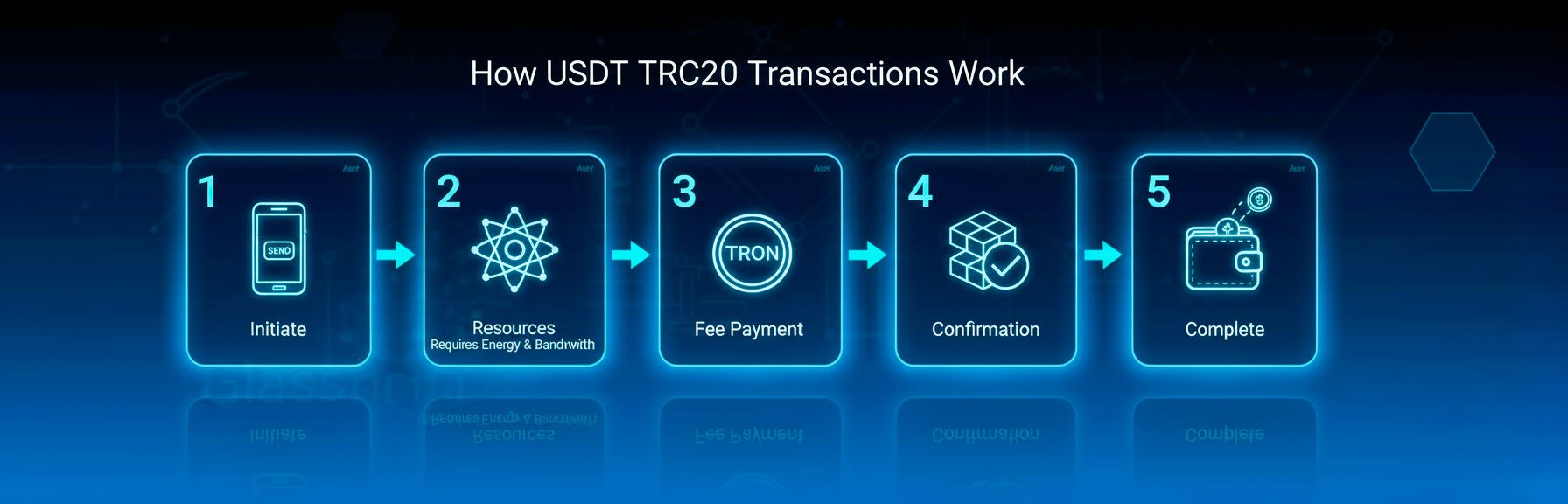
At first glance, transferring USDT TRC-20 in Trust Wallet seems easy: tap “Send,” enter the address and amount. However, if your balance doesn’t have TRX or network resources, the transaction won’t go through — this is the most common issue for new users.
The TRON network uses two resources to process transactions: – Energy – Bandwidth
If your address has no available network resources, TRON burns TRX from your balance to cover the transfer cost.
Even if you have USDT, you cannot send a transfer until you cover the fee with TRX or by using TRON Energy.
Trust Wallet + USDT TRC-20 is a powerful combo.
How to calculate the USDT TRC-20 transfer fee in advance
The TRON network fee doesn’t depend on transaction size or network load (unlike Ethereum). It depends only on one factor: whether the recipient’s wallet already holds USDT.
– If the recipient’s address already has USDT, the fee is about 6,77 TRX (~65000 Energy). – If the address doesn’t have USDT, the fee increases to 13,37 TRX (~131000 Energy).
The fee is fixed in TRX but changes in USD value as the TRX price fluctuates. A few years ago, a transfer cost less than $1 — now it’s around $3.8–7.5 per transaction.
You can check this in advance using Tronscan or the Energy Calculator.
Where to view TRON network resources in Trust Wallet
Trust Wallet shows network resources directly in the token interface. On the USDT TRC-20 screen you’ll see: – Energy — required for sending USDT; – Bandwidth — generated daily.
Example: if you have 0 Energy and 600 Bandwidth, the resources are not enough for a USDT transfer.
In that case, TRX will be burned (if available) to complete the transaction. If you have no TRX either, the transfer will fail. That’s why it’s important to either top up TRX or connect Energy in advance.
What to know about Bandwidth
Each TRON address receives 600 Bandwidth per day, enough for about 1–2 transactions. However, for USDT TRC-20 transfers, Energy is also required.
Which raises a key question: Where can I get TRON Energy to send USDT without paying TRX?
How to get TRON Energy and save on transfer fees
Buy TRX and pay fees directly The simplest option: you buy TRX and pay for resources with each transaction. But this has drawbacks: – You always need to maintain a TRX balance; – It’s expensive at the current rate (around $9 per transfer); – Frequent transfers make the fee costs add up.
Stake TRX (freeze for Energy) TRON allows you to “freeze” TRX to receive Energy — this process is called staking. However: – You need a large amount of TRX, even for a few transfers per day; – After unstaking, TRX remains locked for 14 days; – While frozen, you can’t sell or move it; – There’s a risk of losses due to price fluctuations.
Rent TRON Energy You can rent Energy from other users through dedicated services. In this case, TRX isn’t needed at all — transfers are executed using pre-rented Energy. This avoids TRX burning and significantly reduces fees.
Renting is ideal both for occasional and regular USDT users — whether you send payments, receive funds, or manage multiple wallets. Unlike buying or freezing TRX, renting doesn’t require large investments and gives full control over your expenses.
Renting TRON Energy via Tron Pool Energy
Tron Pool Energy is one of the largest TRON Energy providers in the CIS market, known for reliability and stable performance. Our goal is to let users transfer USDT on TRON without overpaying — quickly, securely, and without needing to buy TRX or deal with technical settings.
Why users choose Tron Pool Energy: – Safe — only your public wallet address is needed; – Private keys and seed phrases are never requested; – Flexible options — 1-hour rental or Unlimited Energy packages (from 10 to 1000 transactions); – 24/7 support — always available to assist; – Fast — activation takes just seconds; – Convenient — works entirely through Telegram, supporting up to 30 wallets per account.
How to start using Tron Pool Energy
There are two simple rental formats to connect Energy and start saving on fees: – Hourly rental — provides resources for one hour, ideal for occasional transfers; – Unlimited Energy — connects resources permanently for a selected number of transfers (from 10 to 1000). Perfect for regular USDT users.
Which format should you choose? Use the Energy Savings Calculator on our website: – Enter your TRON wallet address; – The system will calculate your past 30-day transfer activity and TRX fee costs; – It will show potential savings with Tron Pool Energy; – And recommend the best rental plan — hourly or unlimited.
This is the fastest way to see how much you can save — no guesswork, no manual calculations.
Conclusion
Trust Wallet remains one of the most convenient tools for storing and transferring USDT TRC-20. It provides full control of your funds, supports major blockchains, and has a user-friendly interface. By understanding how TRON works, why TRX is required, and how to add tokens correctly, you can avoid common mistakes and use your wallet efficiently.
Knowing these principles not only saves you on fees — it gives confidence in every transfer. You control your assets directly, without intermediaries or unnecessary limits. That means you can use USDT freely, securely, and entirely on your own terms.
Share
Did you like the article?
FAQ
How to transfer USDT TRC-20 via Trust Wallet?
Open Trust Wallet, select the USDT (TRON) token, tap “Send,” enter the recipient’s address, the amount, and confirm the transaction. It’s important to make sure you have TRON network resources — Energy or TRX coins — to cover the transfer fee.
Why doesn’t a USDT transfer go through in Trust Wallet if there are tokens on the balance?
Because the TRON network requires fees to be paid in TRX. If your wallet doesn’t have TRX or TRON Energy, the transaction won’t be processed. Even if you have USDT, the transfer is impossible without covering the network costs.
How to transfer USDT TRC-20 without buying TRX?
You can rent TRON Energy through the Tron Pool Energy service. In this case, Energy is prepaid, and no TRX is consumed during transfers. This allows you to make transfers without buying TRX or burning coins.
How to add the USDT TRC-20 token to Trust Wallet?
Go to the “Manage Tokens” menu → enter “USDT” → select the USDT (TRON) option with the TRC-20 standard → enable the toggle. The token will appear on the wallet’s main screen.
Where can I view TRON resources in Trust Wallet?
Open the USDT (TRON) tab → “Details.” The interface shows your Energy and Bandwidth levels. If Energy is 0, the transfer will either burn TRX or fail entirely.
Is it safe to use Tron Pool Energy?
Yes. Only your public wallet address is required for connection. The service never requests your seed phrase, private keys, or account access. Energy is connected directly via the TRON blockchain and remains active for the selected period.
TRX calculator
Find out how much you spend on commissions!
Enter your crypto wallet address and we'll calculate how much TRX you've spent on fees over the last 30 days.
TRON Energy rental for 1 hour is a way to reduce USDT TRC-20 transfer fees by up to 80%. Learn how to save money without buying TRX or dealing with staking. Step-by-step guide and key benefits via Telegram.
Learn why you need TRX to send USDT on the TRON network, how to buy it via Trust Wallet, and how to save up to 80% on fees using Tron Energy. Step-by-step guide and smart tips.






 English (EN)
 Русский (RU)
 Українська (UK)
 español (ES)
 Türkçe (TR)